Data cleaning is the process of identifying and correcting errors and inconsistencies in raw data sets to improve their overall data quality. Think of it as routine hygiene for your organisation’s information, like brushing your teeth every day.
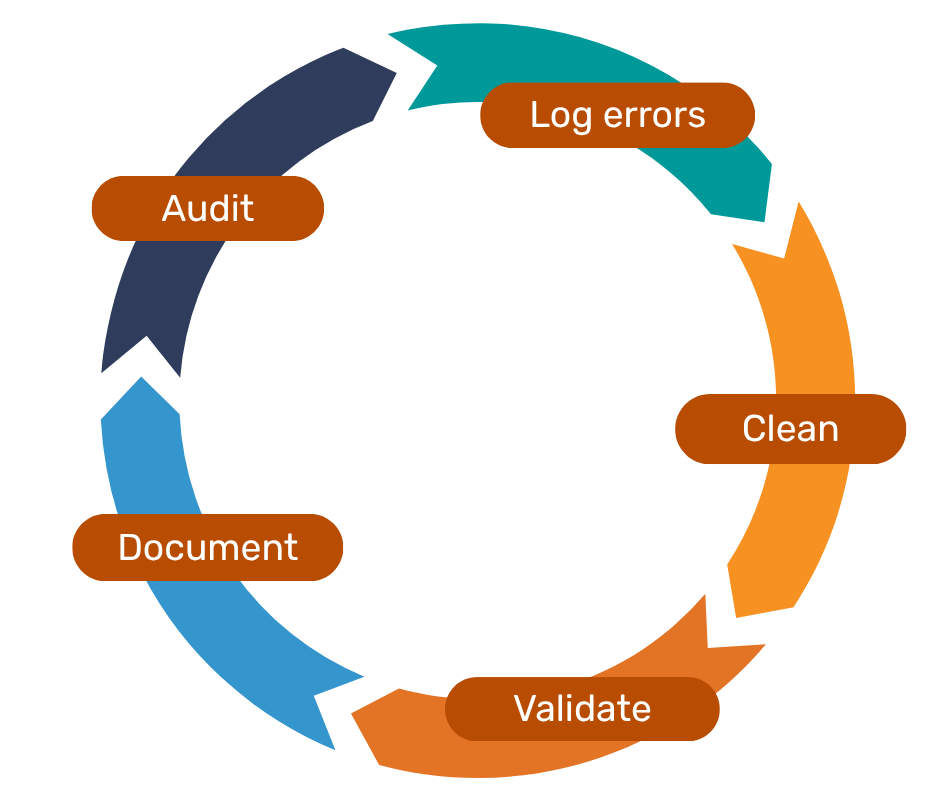
Data cleaning is not complicated, but remember that it is more than correcting existing problems. To ensure the changes you make last, and your efforts aren’t lost to time or a flood of new data, data cleaning needs to be an end-to-end process that you might repeat several times a year, depending on the volume and rate of collection at your organisation.
Here are our suggested steps:
Step 1: Run a data audit
An audit typically begins with an assessment of all your relevant data sources: spreadsheets, documents, and databases. You need to know where it all is to assess its quality and identify any issues. It is also helpful to plan what you want your data to end up looking like, perhaps using a piece of reference data.
Step 2: Log any errors and inconsistencies
Create a comprehensive list of the errors in your data sources, such as missing values, duplicates, or inconsistent formats. If you have a variety of different sources and types of data, this step may feel chaotic and time-consuming, but it is essential to clarify what cleaning techniques are required.
Step 3: Clean the data!
Use appropriate data cleaning techniques based on the issues you have identified. We look at a few techniques in the next section.
Step 4: Validate the outputs
Cleaning is always followed by data validation. Validating data means checking that the process of making corrections, deduping, standardising, and so on, is complete. This involves double-checking the dataset using rules or comparing it with your approved “gold standard” reference data.
Step 5: Document any changes
The final step is to record and document the changes you have made, especially if you want to re-use your approach, or validate and test whether your changes have been effective in future. You may also have recommendations for improvements in your data collection to ensure some of these errors don’t continue.
Different types of data cleaning
Before applying any data cleaning method, always save a backup copy of your original file. This acts as your safety net if something goes wrong, or if you need to revert any changes later. Depending on the issues you identified in your data, there are different methods you can use to perform data cleaning at a basic level:
Data standardisation
Data often becomes messy when the same type of information is recorded in different formats. Standardisation ensures everything follows a consistent structure, making analysis more accurate and reliable.
Common examples include:
Different date formats like “MM-DD-YYYY” vs “DD-MM-YYYY,” which can cause errors or ignored rows.
Inconsistent text entries, such as varying capitalisation or misspellings in names, addresses, or postcodes.
Future fixes include restricting inputs to predefined formats at the point of data collection to minimise manual errors. This could include calendar pop-up fields, drop-down menus for fields such as titles, or auto-populating addresses from postcodes when the data is entered.
Addressing outliers
Outliers are values that sit far outside the normal range. If not handled correctly, they can skew results or distort trends. You might identify an outlier using box plots or histograms.
Examples include:
A charity serving mainly older adults suddenly recording unusually high service use from a young individual.
A satisfaction survey where almost everyone scores 4 or 5, except one person who gives a 1.
To deal with outliers, first understand why they exist. They may appear due to data entry mistakes, rare events, or genuine anomalies. Then decide whether to keep, correct, or remove them based on their relevance to your analysis.
Deduplication
Duplicate records occur when the same information is entered more than once due to system glitches, manual errors, or multiple sign-ups. These duplicates can inflate numbers and mislead analysis.
Examples include:
Preventing duplicates involves strong data governance: clear naming conventions, defined formats, and proper training for those entering data.
Handling missing or incomplete data
Missing values appear when information is not collected, entered incorrectly, or lost due to system issues.
For text-based fields (like addresses or emails), gaps can often be fixed manually or by using logic to match existing records. For numeric fields, such as sales or revenue figures, you may choose to estimate missing values, remove incomplete records, or flag them for further investigation. This process is sometimes called data enrichment, where external or related data is used to fill gaps.
A practical preventive step is to mark essential fields as mandatory in forms or surveys so they cannot be left blank.
Cleaning tools
There are many different tools available to perform basic to advanced data cleaning operations, from Excel to Python. It may depend on the data maturity of your organisation, and your ease of use or access to these tools.
To learn more about data maturity, you can read our article What is your charity’s data maturity? In the meantime, here are some basic tutorials to get started with simple tools.
Excel
Excel is a preferred tool for many organisations, as it is easy to use and has several built-in functions that allow for quick manipulation of data in a fairly short period of time. With a few clicks, a spreadsheet can handle large volumes of data (up to 1 million rows) to generate a cleaner version for further processing.
Example tutorial: 10 Ways to Clean Data in Excel Sheets
Power BI
Depending on your license, Power BI can create interactive reports locally, or act a cloud-based service to share content with other people and teams in your organisation. The sample data used in the example below is from an external source, so when working with your own organisation’s data, make sure you take any usual precautions you would to maintain data security, such as encryption.
Example tutorial: Turn Messy Data Into Insights: Data Cleaning in Power BI Step-by-Step
Conclusion
We have covered critical topics around data cleaning and how this can be done effectively. Data cleaning is not just a basic hygiene step for organisations to maintain data sanity, but a critical future-proofing mechanism to keep data useful.
Further reading